
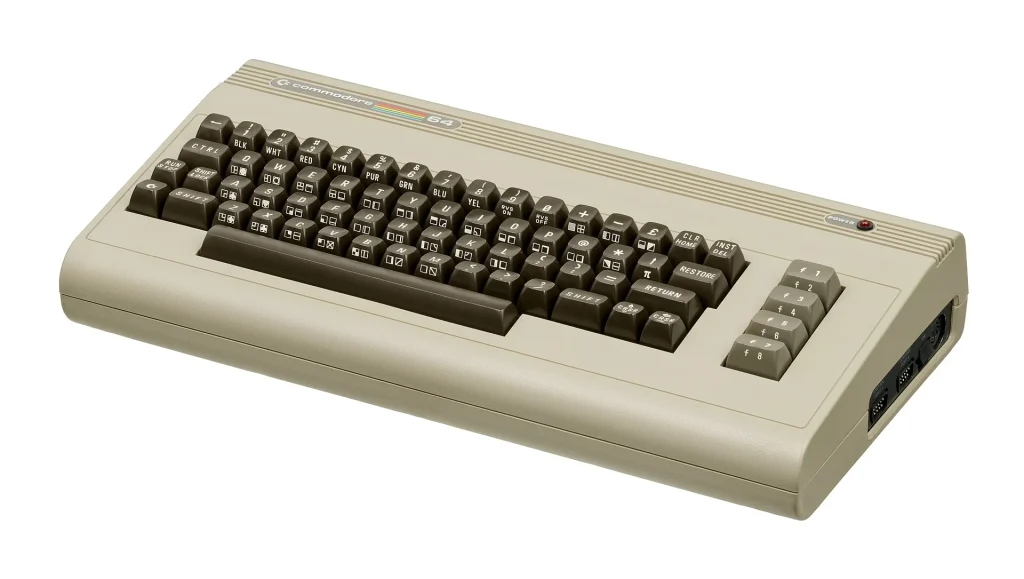
Before game consoles took over the living room, millions of people played and programmed on home computers that plugged into the family television. The Commodore 64, Apple II and Atari 8-bit machines have enormous game libraries and lively communities today. They are also forty years old, and a few well-known faults are worth understanding before you buy.
What to Look For
- Seller shows the computer switched on and displaying its normal startup screen
- Every key on the keyboard registers
- Power supply is included and, for a Commodore 64, ideally a modern replacement
- Video cable is included, or you know which one to buy
- Case is free of cracks, and any disk or tape drive has been tested
Popular Models Worth Seeking Out
These are the machines with the biggest libraries and the best support today.
- Commodore 64 and 64C — the best-selling home computer of all, with thousands of games and a famous sound chip.
- Apple IIe and IIc — reliable and thoroughly documented. The IIc is compact, with a built-in disk drive.
- Atari 800XL and 130XE — excellent graphics and sound, and a strong games catalog.
- Texas Instruments TI-99/4A — common and cheap in the United States, with games on plug-in cartridges.
- Sinclair ZX Spectrum — the British favorite, best suited to buyers with PAL equipment.
Our Pick: A Tested Commodore 64 with a Modern Power Supply
The Commodore 64 is the natural starting point. Nothing else has as many games or as much new hardware made for it, and a modern power supply removes the single biggest risk of owning one.
THE VERDICT
- Boot: Tested to the startup screen
- Keyboard: All keys working
- Power Supply: Modern replacement
- Video: Cable included
Best for: retro gamers and tinkerers who want the real keyboard-and-cartridge experience of 1980s computing.
Pros & Cons
Pros
- Thousands of games, plus new software still being written
- Modern add-ons load software from an SD card
- Simple, well-documented hardware that can be repaired
Cons
- Original Commodore 64 power supplies can fail and damage the computer
- Old floppy disks and drives are increasingly unreliable
Common Problems to Watch For
- Failing power supply — the original Commodore 64 supply can send too much voltage to the board as it ages and destroy chips.
- Dead chips — a black screen or garbled display is usually a failed memory or logic chip. Replacements exist.
- Unresponsive keys — dirty keyboard contacts. Cleaning normally restores them.
- Aged capacitors — filter capacitors in Apple II power supplies are known to fail with a puff of smoke. They are cheap to replace.
- Yellowed plastic — cosmetic discoloration from age and sunlight.
How Much Should You Expect to Pay
- $40–$90: TI-99/4A computers and untested machines
- $120–$220: Tested Commodore 64 or Atari 800XL
- $200–$400: Apple IIe or IIc with a disk drive
- $400+: Boxed, restored or rarer systems
Quick Questions, Answered
How do I connect one to a modern TV?
Most have a composite video output that works with a TV’s yellow video input, or with an inexpensive composite-to-HDMI converter.
How do I load games without old disks?
SD card devices that imitate a disk drive are available for all the popular machines, and they load software in seconds.
Is it safe to use the original power supply?
For a Commodore 64, a modern replacement is strongly recommended. Other machines are less risky, but any old supply deserves a check.
Ask for a photo of the screen right after power-up. A Commodore 64 should show its blue startup screen with the line 38911 BASIC BYTES FREE, which confirms the main chips are working.